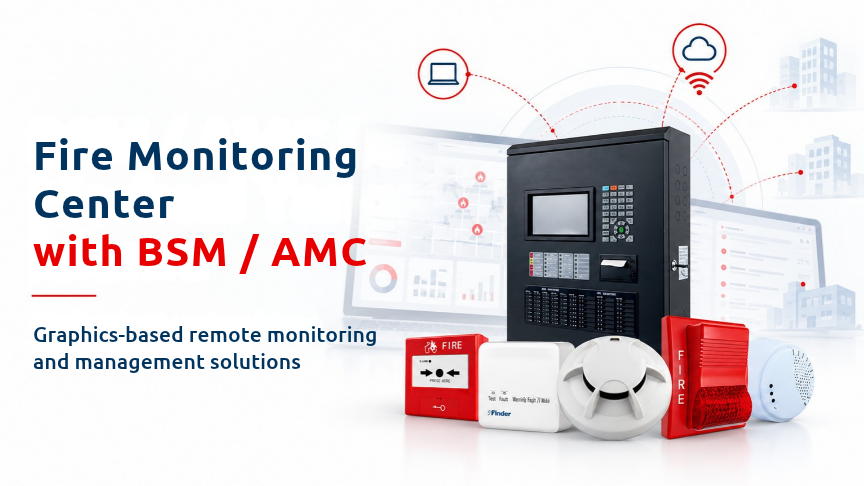
Finder BSM combines a server structure that communicates with fire alarm panels, stores event records in a database and distributes them to clients with an operator interface. Finder AMC enables remote monitoring of the fire alarm system from outside the facility. Together, these applications help operators view event locations on floor plans, filter alarm and fault records and perform actions within their authorised scope.
The fundamental safety boundary is clear: BSM and AMC do not replace the fire alarm panel. Even if the software is unavailable, the panel continues to operate independently. Evacuation decisions are carried out according to the facility fire emergency plan and the indication provided by the fire alarm panel.
Finder BSM consists of two main components. The BSM server communicates with panels, stores event records in the database and distributes those records to clients. It is kept in continuous operation and powered through an uninterruptible power supply. The BSM client is the operator interface used for graphic monitoring, alarm handling, command sending and log queries. Its use depends on project membership and user authorisation.
Finder AMC enables off-site monitoring of the fire alarm system. It focuses on alarm and fault notifications and panel-status monitoring. The REA data modem connects to the panel within the BSM/AMC architecture and communicates with the server over TCP-IP, providing the data connection between the panel and server.
|
Component |
Main role |
Use focus |
|
BSM server |
Panel communication, database and distribution to clients |
Continuous operation |
|
BSM client |
Graphic monitoring, alarm handling, commands and log queries |
Operator use |
|
AMC |
Remote monitoring from outside the facility |
Alarm, fault and panel-status monitoring |
|
REA data modem |
TCP-IP communication between panel and server |
Data connection |
The operator is responsible for daily monitoring and alarm/fault handling; the system administrator manages users, backups and panel commands; and the commissioning technician handles installation, drawing import and device matching. Operator stations should be kept inaccessible to unauthorised users, and commands should be carried out according to user authorisation.
The manual defines three main installation topologies. In the single-computer topology, the server and client run on the same computer and may be used in small facilities with one operator. In the server + multiple-client topology, a separate server and several operator stations are used, suitable for buildings with a security centre. In the server + client + AMC topology, off-site remote tracking is added to on-site monitoring for facilities requiring after-hours monitoring.
Before installation, confirm that the computers meet the system requirements referenced by the manual. The server should be powered through a UPS, while the server and clients should operate on the same network with fixed IP addresses prepared in advance. Required TCP/UDP ports selected by the customer should be opened, and the panel communication card should be installed and configured.
Vector AutoCAD DWG floor plans should be prepared for graphic monitoring. An up-to-date address list containing loop, address, device type and location name should also be ready before installation.
According to the source, server installation begins with support from a Finder IT/software technician. Docker and MYSQL are installed, and a customer-specific MYSQL username and password are created. Ports and BSM Dashboard database credentials are configured. The activation key is obtained from the IT/software technician, the Dashboard is restarted and the administrator account is created.
On the client, the server IP and port information are defined and the user's membership in the relevant project is confirmed. This allows the client to access project and event information according to the correct authorisation.
For project and panel definition, the administrator signs in and creates the project. A panel-related “reasure” record is added on the modem page and its type, ID, panel type and name are entered. The Reasure card is then directed to the server through Configurator, and communication tests are completed with a Finder IT/software technician.
The building, block and floor hierarchy is created in BSM. A scaled vector plan with unnecessary layers removed is imported. Following the workflow described in the manual, the DXF drawing is converted to SVG with support from a Finder IT/software technician and placed in the project folder.
Every device read from the panel should be positioned at its actual installation point. Each point should have a clear and unambiguous location name; the manual uses “room no. 5002” as an example.
This matching process is not merely visual. If a device has not been placed on the drawing, the plan may not open when an alarm arrives. If the device is shown in the wrong position or the location name is outdated, the operator may be directed to the wrong location. Drawings and location names should therefore be updated whenever walls, room names or device locations change after renovation.
The upper strip of the graphic monitoring screen shows building and floor information as well as event text containing address, loop, node and location information. The left panel list displays connected panels and their live states; selecting a panel opens the corresponding drawing. The centre contains the vector floor plan, device symbols, zoom and pan functions. The right action bar gives quick access to frequently used actions. Device details include address, loop/node, device type, location and current status.
The manual lists device states as Normal, Alarm and Fault. It does not define an exact colour mapping, so fixed colours should not be assigned based on this source.
The BSM log screen can be used to query alarm, fault/error, reset and information events. Filters include project and panel, date range, user actions, connection status and quick location search by name or address. User actions include silence, reset and disable operations, while connection status includes panel–server communication interruptions.
Each log row includes the panel name, user, event number, event type, node, loop and address. The log page supports CSV export. To prepare a log report, select the date range, choose the required project or panel, select the event type, apply a user filter if required and then print the result or export it as CSV.
The manual requires weekly database backups. Weekly checks should confirm that the backup has completed and verify disk utilisation.
At the beginning of a shift, the operator should verify whether all panels are online and whether any communication interruption exists. Open unacknowledged alarms, active faults remaining from the previous shift and disabled devices should be checked. If devices are disabled, the plan for returning them to service should be known. Detectors showing contamination or maintenance warnings should also be reviewed.
If a server connection error is displayed during login, first check the server status and restart the server. If the problem continues, contact a Finder IT/software technician.
First verify the alarm location by reading the marked point, building, floor and location information on the plan opened by the software. The alarm can then be accepted. The username and time are recorded. Acceptance does not mean that the alarm has ended; it only records that the user has seen the event.
If a camera has been defined, the nearest camera may be checked. The facility emergency team is dispatched using the location information. Evacuation, fire-brigade notification and intervention decisions are carried out according to the facility fire emergency plan.
Reset should only be applied after the alarm has ended, the area is safe and the field inspection has been completed.
Repeated alarms from the same address may indicate a false alarm condition. Disabling the detector is not the solution. Contamination, moisture, steam, dust and the possibility of an unsuitable detector type should be investigated and a maintenance record opened.
When a fault occurs, read the fault message and its location. Note whether it is a device fault, line break, short circuit, supply fault or communication interruption. Notify maintenance and open a record. Assess whether detection has been affected and apply temporary surveillance if required.
Reset clears the alarm or fault state on the panel. Before resetting, verify that the cause has been removed. If the system alarms again after reset, the actual condition may still be present.
For AMC installation, the REA modem is connected to the panel and supplied with 24 V DC power and a backup battery. Using Configurator, the modem is directed to the AMC server instead of a personal server. The AMC application is installed on the smart device; the source states that the application can be found as “AMC Finder” in the Play Store and iOS store.
A Finder IT/software technician creates the project and user, and all functions are tested. AMC provides alarm and fault notifications. Event location can be displayed when the floor plan has been defined. Panel states can be monitored and commands may be sent when the appropriate authorisation has been granted. The system communicates continuously with the main server.
If the server cannot be reached or login fails, the internet connection and antivirus should be checked. If no problem is identified, Finder should be contacted.
|
Frequency |
Check |
|
Daily |
Panel connection, open alarm/fault events and disabled devices |
|
Weekly |
Backup completion and disk utilisation |
|
Monthly |
Alarm/fault report, repeated false alarms and user accounts |
|
Yearly |
Sample alarm drill on every floor to confirm correct location and update floor-plan changes |
|
After renovation |
Update drawings and location names if walls, location names or device positions have changed |
Periodic maintenance is not limited to checking whether the server or software is running. Panel connectivity, open events, disabled-device status, log records, backups and graphic location accuracy should be considered together.
If the client cannot connect to the server, check whether the server service is running, verify the IP and port information and inspect the firewall. If the panel is offline, check the communication card, cable and panel operating condition.
If an alarm arrives but the plan does not open, the device may not have been placed on the drawing and device matching should be completed. If the location is incorrect, the device may be misplaced on the drawing or the location name may be outdated. Compare the address list with the drawing and update changes after renovation.
If the plan is slow, check unnecessary DWG layers and detail as well as hardware adequacy. If logs cannot be queried, inspect the disk and database and consider archiving old logs. If the audible warning cannot be heard, check operating-system and application sound settings; the operator station should not be muted.
When requesting technical support, provide the software version, licence number, panel make and model, and the date and time of the event.
Do BSM or AMC replace the fire alarm panel?
No. BSM and AMC are monitoring and management applications. A software outage does not mean that the fire detection system has stopped operating; the panel continues to work independently.
What does the BSM server do?
The BSM server communicates with panels, stores event records in the database and distributes those records to clients. The server is kept running continuously and is powered through a UPS.
Does accepting an alarm end it?
No. Acceptance records that the user has seen the event. Reset is applied only after the alarm has ended, the area is safe and the field inspection has been completed.
Can AMC display the event location?
Yes. AMC can display the event location when a floor plan has been defined.
How are BSM logs exported?
Select the date, project or panel, event type and user filters. The search result can be printed or exported as CSV from the log page.
What should be updated after renovation?
Drawings and location names should be updated when walls, location names or device positions change. An outdated drawing may direct the operator to the wrong location.
Finder BSM helps monitor panel events through floor plans, logs and user workflows using its server and client structure. Finder AMC extends this monitoring beyond the facility. Correct use requires current drawing and address matching, shift checks, the correct alarm–fault workflow, regular backups and periodic checks.
The fundamental system boundary remains unchanged: BSM and AMC do not replace the panel. The panel continues to operate independently. Graphic monitoring and remote tracking should therefore be considered a management layer that provides operators with organised information about event location, event history and system status, rather than a replacement for the fire alarm panel.
 TR
TR